AI Business Card Printer: How to Go From AI Design to Printed Cards (2026)
To print a card you made with AI, upload the image to a printer, move the design into an editor and order from a separate printer, or use one tool that designs and prints. Either way, check spelling, size, bleed and the QR code first. Kleido's AI business card generator keeps every field editable and includes US shipping on prints.
What are the three ways to print an AI business card?
Your route depends on what the AI gave you. A picture of a card and a card with editable fields need different work.
- Upload an AI image to a printer. You ask ChatGPT, Claude or Gemini for a card and get back a PNG or JPG. You upload it to a printer that accepts images. The text is baked into the picture, so a typo means a new image or a rebuild.
- Use an AI design tool, then a separate printer. You generate or rebuild the card in a design tool, type your details as real text, export a print file at the printer's size and upload it. You control every correction, and you also do all the file prep.
- Use an all-in-one tool. Kleido builds an editable two-sided layout from your website and prints it after you approve it. Design, review and the print order happen in one place.
Pick the route that leaves you the least repair work. A good-looking image with the wrong phone number still needs fixing before you pay for cards.
Why do AI images fail in print?
The text looks right and isn't. InkFE's ChatGPT guide shows generated cards with words like "Desgin" and "Evnets". Read every character, especially your email address and phone number. Uploading the image does not make that text editable.
The shape is wrong. Image models output fixed shapes, and a business card is 3.5 x 2 in. InkFE notes that a square image loses about 41% of its height when it is cropped to card shape. That crop can cut off your name or logo. A wide ChatGPT image at 1536 x 1024 px fits much better. InkFE puts it at about 424 ppi at card size.
The resolution is too low for the size. At 300 DPI, a 3.5 in wide card needs 1,050 px across before you add bleed. Images saved from a chat or a screenshot often fall short. They print soft or show jagged edges.
The colors are screen colors. AI images come out in RGB, the color model of your screen. Printers print in CMYK ink. Bright blues and greens often print duller than they look on screen. Follow your printer's color instructions and check the proof.
There is no bleed. The printer trims each card from a larger sheet, and the cut can drift slightly. If your background stops exactly at the card edge, you can get a thin white line. Stretching a finished image to cover the bleed also pushes your text toward the cut.
The QR code doesn't scan. An image model can draw something that looks like a QR code and points nowhere. Scan it with your phone and open the link before you order. For more problems to catch, see these business card design mistakes.
What print specs should your file meet?
Run through this checklist before you upload a file or approve a proof.
- Trim size. A standard US card is 3.5 x 2 in after cutting. Your file is larger because it includes bleed.
- Bleed. Extend the background past the trim line on every edge, by the amount your printer asks for.
- Safe zone. Keep your name, contact details, logo and QR code inside the printer's safe area, which sits inside the trim line.
- Resolution. Use 300 DPI at final size unless your printer asks for more.
- Text. Keep text as live, vector text in your print file. Putting a flat image inside a PDF does not turn its letters back into text.
- Color. Use CMYK if your printer asks for it, and check the proof either way.
Bleed is not one fixed number. Each printer publishes its own:
| Printer | Bleed per edge | File size with bleed |
|---|---|---|
| InkFE | 1/16 in | 3.625 x 2.125 in, or 1088 x 638 px |
| BotPrints | 1/16 in | 3.625 x 2.125 in |
| MOO | about 0.08 in | 3.66 x 2.16 in |
| GotPrint | 0.1 in | not listed, asks for 350 DPI CMYK |
| Classic Printing & Signs | 1/8 in | 3.75 x 2.25 in |
If you haven't picked a printer yet, design with 1/8 in bleed. A printer can trim extra background. It cannot add background that is not there. Then match the file to your printer's template. The business card size, bleed and safe zone guide shows where each boundary sits.
How do you print a ChatGPT or Claude design yourself?
First, check what you have. A PNG, JPG or WebP is an image, even if it came from Claude or Gemini. Treat it as artwork, not as a layout you can edit.
- Pick the printer first. Download its template or note its bleed and safe zone before you resize anything.
- Check every field. Compare the text in the image against your real details. If a word is wrong, rebuild that text in an editor. Don't ask for another image and hope the typo goes away.
- Fit the layout. Extend the background into the bleed. Keep everything important inside the safe zone. Don't stretch the image to change its shape.
- Prepare the file. Check pixel size, color and the formats your printer accepts. Keep your editable source file for the next reprint.
- Read the proof. Look at both sides at actual size. Scan the QR code and open the link before you approve.
At InkFE, the steps are to upload the ChatGPT image to its Designer, tap Fill and check the text. It accepts PNG, JPG or WebP up to 25 MB, and a person on its team reviews the design. Do your own spelling check anyway.
How does Kleido go from website to printed card?
You start with your website URL instead of a prompt. Kleido reads your logo, colors, typography, tagline and tone from the page's HTML using deterministic parsing, so the values come straight from your site. The website to business card page shows this step.
Next, an AI model built on Anthropic's Claude lays out a two-sided card at real print size. The output is editable HTML, not a flat image. Your name and phone number stay text you can change.
Before anything prints, you can:
- Edit any field inline.
- Flip between the front and the back.
- Regenerate one side and keep the other.
- Lock identity fields, such as your name and contact details, while you try new designs.
- Scan the QR code.
Nothing prints until you approve it. Then pick matte or gloss and squared or rounded corners. If you're a paying user, you can also download a print-ready PDF. The print-ready business card maker covers that output.
Which AI business card printer fits your workflow?
Every option below prints cards for a fee. Compare sides, paper and finish along with price, because the cheapest entry is not always the same card.
| Tool | Design method | Editable text | Print included | Price for 100 | Shipping region |
|---|---|---|---|---|---|
| Kleido | Website URL to AI layout | Yes, HTML fields | Yes | 18 credits matte, $27.00 to $32.40; 22 credits gloss, $33.00 to $39.60; US shipping included | US only, waitlist elsewhere |
| InkFE | Upload an AI image to its Designer | No, text is in the image | Yes | From $19.99, Essential 14pt matte | US |
| Classic Printing & Signs | Converts your AI image | No, text is in the image | Yes | $44.99 house 12pt gloss, two sides | US |
| BotPrints | Built-in AI generator | Not listed | Yes | $16.50, 14pt or 16pt, color both sides | Not listed |
| Canva Print | Design in Canva | Yes | Yes | $19, standard paper, matte, square corners | Not listed |
| Vistaprint | Templates or your upload | Yes in templates, no in an uploaded image | Yes | $14.99, 14pt matte, front only | Not listed |
| MOO | Templates or your upload | Yes in templates, no in an uploaded image | Yes | $45.00, 16pt, matte or gloss, two sides | Not listed |
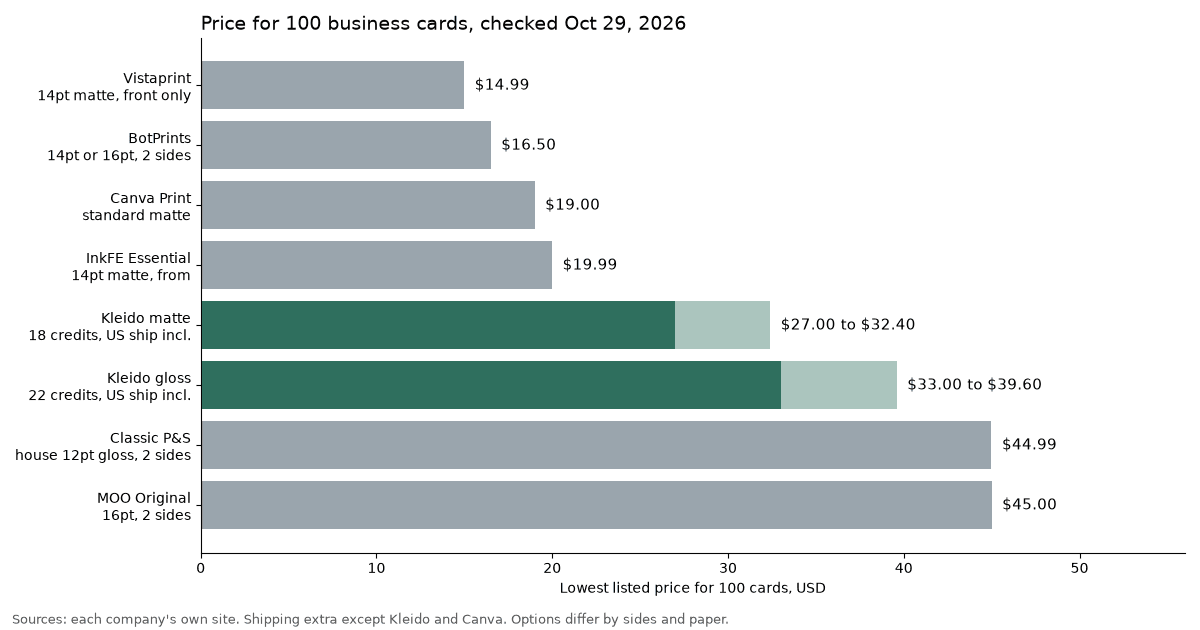
Prices checked Oct 29, 2026 on each company's site. Shipping is extra unless noted.
What do 100 cards cost?
At Kleido, 100 matte cards cost 18 credits and 100 gloss cards cost 22, with US shipping included. A credit costs $1.50 to $1.80 depending on how many you buy. That puts 100 matte cards at $27.00 to $32.40 and 100 gloss at $33.00 to $39.60.
You buy credits, not a subscription. Your first design is free with the credit you get at signup. After that, each design costs 1 credit, and credits never expire. The packs are Starter at $24 for 15 credits, Growth at $40 for 25 and Pro at $75 for 50. You can also buy custom amounts at $1.80 a credit for 5 to 14, $1.60 for 15 to 49 and $1.50 for 50 to 200. See pricing for the full print table.
Here's what the others charge for 100:
- InkFE. Essential 14pt starts at $19.99. Ink 16pt starts at $24.99, double-sided, matte or gloss. Shipping is calculated at checkout, and the site offers free shipping over $50 with a code.
- Classic Printing & Signs. $44.99 on house 12pt gloss or 100lb uncoated, both sides in color. $85.33 on 14pt gloss UV or 16pt matte. Its product pages list a $50 file setup fee for AI images, while its AI landing page promises free AI design conversion with an order. Ask before you pay.
- BotPrints. $16.50 for 100 on 14pt or 16pt, color on both sides. The site doesn't list shipping cost or region.
- Canva Print. $19 for 100 on standard matte paper with square corners, with free standard shipping.
- Vistaprint. $14.99 for 100 on 14pt matte, printed on the front only. Printing the back and rounded corners cost extra, and glossy adds $1.00. Economy shipping is free on orders over $100.
- MOO. $45.00 for 100 Original cards on 16pt, with both sides and matte or gloss at no extra charge. Shipping is extra.
The lowest sticker price isn't always the lowest total. A front-only card, a separate setup fee or shipping can change the order. Price the exact card you want, with both sides, your finish and shipping, before you compare.
Should you pick matte or gloss, square or rounded corners?
Pick matte if people will write on your card or if the design is mostly text. Matte has little shine, so it's easier to read under bright light. Pick gloss if your card is photo-heavy or uses saturated brand colors. Gloss makes them look brighter.
Rounded corners change the price at some printers and not at others:
- Kleido charges the same for squared and rounded corners. Gloss costs more credits than matte.
- MOO offers matte or gloss and square or rounded corners on Original cards.
- BotPrints adds $14.75 for rounded corners on 100 cards.
- Classic lists 100 rounded cards at $92.33 on 14pt gloss or $93.16 on 16pt matte, with a 1/4 in corner radius.
- Vistaprint charges extra for rounded corners.
If you choose rounded corners, keep logos and text clear of the corners. A 1/4 in radius removes more of the card than you might expect.
Where to start
If you already have an AI image, check it against the spec list above and pick a printer that publishes its bleed and file setup rules. If you'd rather start with editable text, try the AI business card generator. Paste your URL, review both sides and approve when every detail is right.
Sources
- packs, custom credit tiers, print credits table, 100 matte 18 credits ($27 to...
- URL extraction, Claude-based layout, editable HTML, inline edit, flip, regene...
- kleidoprint.com/generate
- kleidoprint.com/print-ready-business-card-maker
- kleidoprint.com/blog/business-card-size-bleed-safe-zone-guide
- 1/16 in bleed, 3 5/8 x 2 1/8 in, 1088 x 638 px, ChatGPT 1536 x 1024 about 424...
- 3.625 x 2.125 in with bleed, safe zone 3.375 x 1.875 in.
- 3.66 x 2.16 in with bleed, safe area 3.34 x 1.84 in.
- 0.1 in bleed, 350 DPI CMYK.
- 1/8 in bleed, 3.75 x 2.25 in file, $50 AI file setup line.
- "free AI design conversion with any business card order".