The VistaPrint AI Print Debacle: Why Human Verification Matters in Print Design
When artists and small-business buyers across X, Threads, Reddit, and Bluesky reported that approved VistaPrint print jobs arrived with unexpected AI-generated artifacts and altered crops, it exposed a fault line in modern printing. AI in design is game-changing when paired with human guidance—and damaging when it alters a job without verification. Here is what went wrong, why automated AI wrecks print typography and artwork, and how Kleido keeps every approved order untouched and every line of text locked to real fonts.
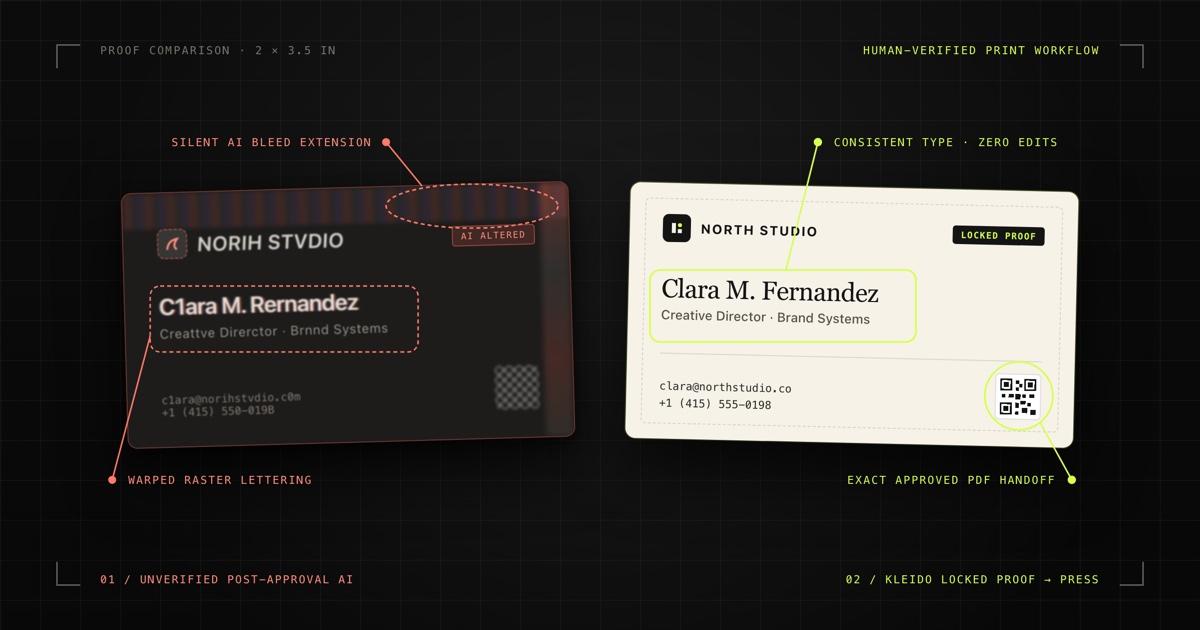
What happened in the VistaPrint AI print debacle?
In October 2026, a wave of complaints swept across X, Threads, Reddit, YouTube, and Bluesky after creators reported receiving physical VistaPrint orders that did not match the proofs they had approved. The spark was a viral post from artist and VTuber @JueriHaan, who ordered 100 glossy business cards after reviewing and approving the crop in the VistaPrint preview. When the box arrived, the framing had shifted downward and the top edge above the character’s head was filled with strange, hallucinated AI-like artifacts—forcing her to scrap the run and delay her release.
As the thread traveled across social platforms and print-industry discussions on Reddit’s r/Printing, other buyers chimed in with similar experiences: an artist whose intentionally cropped elbow was extended with AI-invented padding, and a late-October Bluesky thread warning that a request to brighten a dark custom shirt print appeared to run the original illustration through an AI filter that distorted the artwork. Print professionals pointed immediately to automated prepress pipelines—specifically generative bleed-extension ("outpainting") and AI upscaling tools used to patch missing bleed margins or low-resolution uploads.
VistaPrint denied deliberately altering files with AI—stating in a widely quoted response covered in October 2026 that "we never intentionally modify or enhance customer designs using AI. We print the design based on how it was submitted and approved by the customer without making changes to the artwork." Yet buyers quickly pointed to VistaPrint’s Privacy Policy (updated October 20, 2026), which explicitly reserves the right to "use automated tools to assist, support and enhance the quality and efficiency of our Vista Services, such as conducting quality assurance to detect and correct design or print issues, like image resolution, layout or print file issues."
The sharpest irony came from VistaPrint’s own leadership just weeks earlier. In a September 2026 Inc. magazine interview—after VistaPrint pulled an internal AI-generated ad that drew online backlash—Global Executive Creative Director Julie Halloran drew a clean distinction between offloading repetitive work to AI and outsourcing judgment: "Anyone can generate creative work now. Not everyone can judge it." When automated print pipelines modify artwork after a buyer signs off, human judgment is removed at the exact moment it matters most.
Why unverified AI breaks print jobs—especially text and edges
Print is unforgiving compared to a phone screen. A 3.5 × 2 inch business card is held a foot from someone’s eyes, printed at 300 DPI or higher, and trimmed with physical steel blades. Unverified AI breaks print in two distinct places:
- Silent post-approval prepress (outpainting and AI upscaling): High-volume print platforms constantly receive flattened JPEGs or PNGs with missing bleed margins or web-resolution assets. Rather than rejecting the file or asking the buyer to fix it, automated prepress tools can stretch, sharpen, or AI-extend edges to meet trim specs. Because generative models invent pixels that never existed in the source file, small framing fixes turn into phantom hairlines, weird edge textures, and shifted crops the buyer never approved.
- Pixel-first typography (treating letters as texture): Diffusion image generators and raster AI upscalers do not read text as characters in a font—they predict visual strokes. Even VistaPrint’s own July 2026 guide to AI for small-business design cautions that AI image tools produce "text that looks readable but is actually nonsense," warning buyers to set logos, business names, QR codes, and final typography manually and noting that AI upscalers magnify existing distortion on fine lettering and hard edges. On a business card where contact lines sit at 7–9 pt, a tiny pixel hallucination turns an email address or phone number into an unusable reprint.
We covered the mechanics of why flat raster AI images fail on press in our AI business card printer guide. The October 2026 backlash simply proved the same rule from the opposite direction: even if a customer starts with clean original artwork, letting opaque AI touch the file after approval destroys trust instantly.
Where AI belongs in print design—and where it does not
The lesson of the VistaPrint controversy is not that AI has no place in print design. Used upstream—under human direction, constrained by real print geometry, and verified before sign-off—AI eliminates hours of template hunting and manual brand reconstruction. Used downstream as a silent filter over an approved file, it becomes a liability.
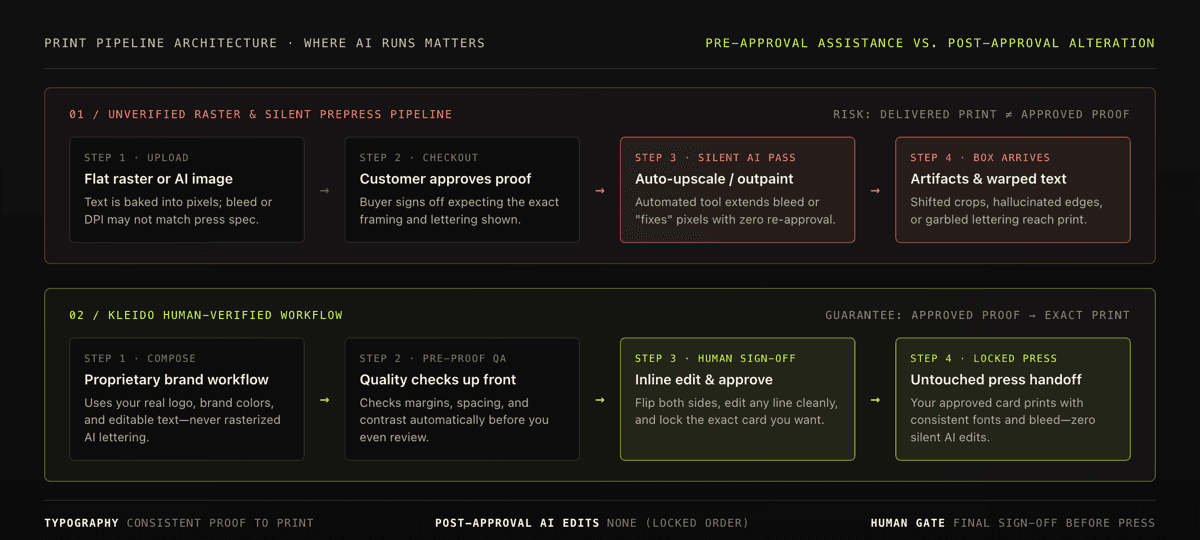
| Print stage | Unverified raster / silent prepress AI | Kleido human-verified workflow |
|---|---|---|
| Text & fonts | Painted as pixels or raster-upscaled; small type can blur, merge, or drift into gibberish | Proprietary typography workflow keeps text editable and fonts consistent from proof to print |
| Editing a word | Re-generating the image risks shifting fonts, kerning, or unrelated layout details | Edit any word inline directly on the card—text updates cleanly without shifting fonts or layout |
| Logos & marks | Image models frequently redraw, misspell, or warp brand marks | Uses your real brand logo directly from your website—never redrawn or invented by AI |
| Bleed & trim | Missing bleed triggers risky auto-cropping or AI outpainting around edges | Designed at exact physical card dimensions with print-ready bleed and crop marks prepared up front |
| Quality checks | Often caught only after the physical box arrives—or silently "corrected" without notice | Built-in print quality checks catch layout or contrast issues before you review and approve |
| After approval | Opaque automated tools may alter resolution, crop, or brightness post-checkout | Zero edits after approval: your approved order is locked and goes straight to press untouched |
How Kleido keeps approved orders untouched and typography consistent
Kleido is built around a strict boundary: AI helps you explore strong, on-brand layouts quickly, while our proprietary workflow and human sign-off protect your assets, typography, and final print order. Here is what Kleido does—and refuses to do—at each step:
- Real brand assets, never hallucinated logos: When you paste a URL on kleidoprint.com/generate, Kleido pulls your brand colors, typography cues, and logo directly from your site. Your actual logo goes onto the card untouched—AI never redraws or invents a substitute mark.
- Proprietary workflow for consistent text and fonts: Instead of baking letters into a flat image where AI can distort spelling or warp small type, Kleido uses a proprietary workflow that keeps every line of copy editable and locks fonts, line breaks, and spacing consistently from your on-screen proof all the way to the finished print. Names, roles, emails, phone numbers, and loyalty offers stay sharp and legible.
- Quality checks before you approve, not silent fixes afterward: Before a card ever reaches your screen, Kleido runs built-in print quality checks to catch overlapping text, tight margins, or low contrast early. From there, you stay in full control: flip both sides, compare up to 4 variants, and click any line of copy to edit it inline without re-rolling your typography or layout.
- Untouched handoff once you approve: Once you place a print order, Kleido locks your approved design and sends it straight to print with print-ready bleed and crop marks already prepared. We never run an AI upscaler, outpainter, or automated filter on top of an approved submission—and your order confirmation email includes front-and-back proofs matching the exact file going to press.
That same guarantee applies across both business cards and Kleido loyalty stamp cards, and paying customers can also download the exact print-ready PDF directly if they want to verify it in Acrobat or take it to a local shop.
5 checks to run before approving any print order
Whether you print with Kleido, a local neighborhood press, or a large online vendor, five quick habits protect you from silent prepress surprises:
- Inspect the press PDF, not just a checkout thumbnail: Zoom to 200% on the smallest contact lines, logo edges, and QR code. If you can select text in the PDF, it is true vector type rather than a rasterized image waiting to be upscaled.
- Give the printer real bleed up front: Automated bleed-extending tools usually trigger when artwork stops at the trim edge. Know your printer’s exact bleed and safe-zone specs—see our business card size, bleed, and safe zone guide for exact dimensions.
- Keep small typography above print minimums: Stick to readable point sizes and strong contrast so neither ink gain nor compression degrades your contact details. Check our business card font size and typography guide before locking a layout.
- Check the vendor’s policy on automated file "corrections": Read whether the print shop reserves the right to auto-upscale, sharpen, or extend uploaded files without sending a new proof—and ask support to flag your order "print as supplied, no automated edits" if you are supplying custom illustration.
- Save your approved proof and compare on delivery: Keep the confirmation proof or downloaded PDF on hand. If the physical box arrives with altered framing, phantom artifacts, or mutated lettering, side-by-side proof comparison makes a reprint or refund claim unambiguous. For more pre-press pitfalls to catch early, see our 12 business card design mistakes checklist.
The takeaway: AI works best with human guidance, never silent overrides
AI in design is genuinely transformative when it handles the slow, mechanical parts—reading a live website’s brand system, exploring multiple strong layouts, enforcing safe margins, and catching print defects before a human ever spends time editing copy. A founder or small shop can move from a URL to a crisp, on-brand physical card in minutes instead of fighting a template editor for an afternoon.
What the VistaPrint debacle made painfully clear is the other half of that equation: running AI without verification—or letting opaque automation alter a print job after a customer already signed off—turns a helpful shortcut into a trust-breaking disaster. Great print tools keep the human in charge of the final proof, keep text and fonts locked to real vector typography, and print exactly what you approved.
Sources
- Inc. Magazine (Sept 19, 2026) — Anyone Can Generate Creative Work Now. Not Everyone Can Judge It.
- VistaPrint Privacy and Cookie Notice (updated October 20, 2026)
- VistaPrint Hub (July 27, 2026) — How to Use AI for Small Business Design
- Reddit r/Printing (Oct 16, 2026) — Discussion on AI prepress tools and the VistaPrint artwork controversy
- YouTube (Oct 7, 2026) — Coverage of the @JueriHaan VistaPrint business card thread and VistaPrint’s quoted response
- Kleido Blog — AI Business Card Printer: How to Go From AI Design to Printed Cards
- Kleido — Print-Ready Business Card Maker